
Exploring the seamless integration of Zoom API into your CRM system opens up a world of possibilities for enhanced communication and data management. Let's delve into the intricacies of this process and discover how it can revolutionize your CRM experience.
Providing a step-by-step guide on setting up Zoom API and discussing the key components involved in connecting it with CRM systems will be the focus of our discussion.
Introduction to Zoom API and CRM integration
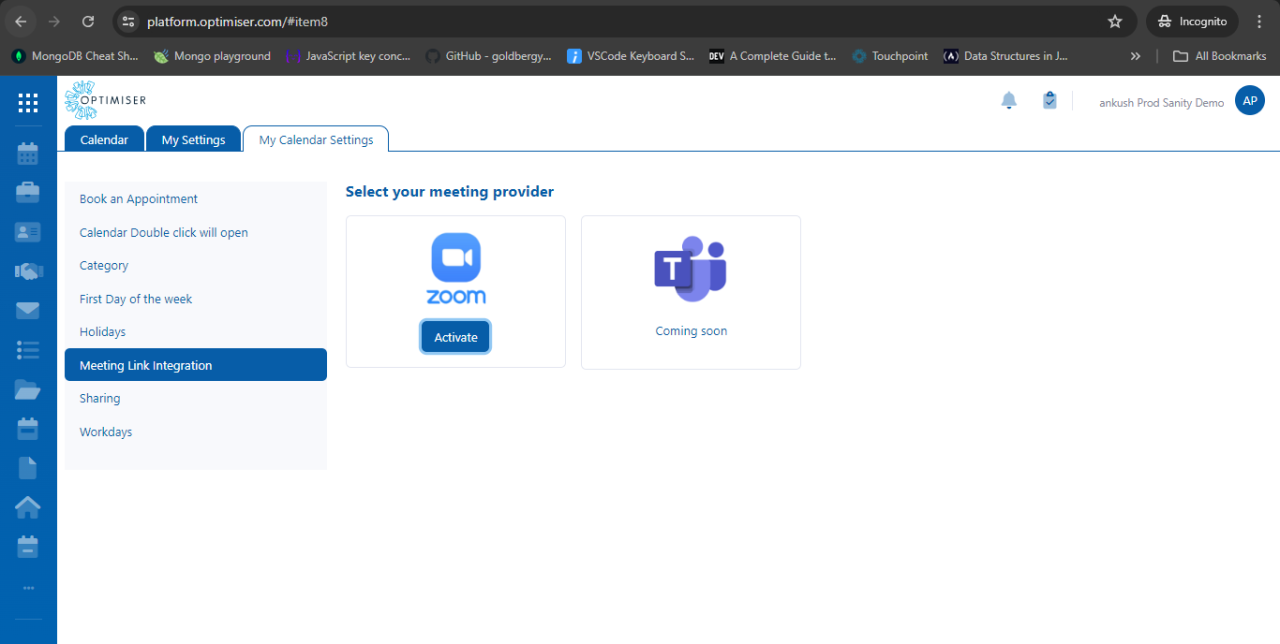
Zoom API is a set of RESTful APIs that allow developers to easily integrate Zoom's video conferencing and webinar functionalities into their applications. With Zoom API, developers can create, schedule, and manage Zoom meetings, webinars, and recordings programmatically.
Integrating Zoom API into CRM systems is crucial for businesses looking to streamline their communication and collaboration processes. By connecting Zoom's video conferencing capabilities with CRM platforms, companies can enhance customer interactions, improve team collaboration, and boost overall productivity.
Examples of CRM systems that can benefit from Zoom API integration
- Salesforce: By integrating Zoom API with Salesforce, sales teams can schedule video meetings directly from the CRM platform, track meeting attendance, and store recordings for future reference.
- HubSpot: HubSpot users can leverage Zoom API to host webinars, conduct virtual meetings, and automatically log meeting details and outcomes in the CRM system for better lead management.
- Zoho CRM: Integrating Zoom API with Zoho CRM enables businesses to create personalized meeting links, automate meeting reminders, and sync meeting data with customer records for a more personalized customer experience.
Understanding the process of integrating Zoom API into CRM
When it comes to integrating Zoom API into your existing CRM system, it's essential to follow a systematic approach to ensure a smooth and successful integration. This process involves setting up Zoom API for integration, understanding the key components required, and comparing different methods of connecting Zoom API with CRM systems.Setting up Zoom API for integration
To start the integration process, you first need to create a Zoom Developer Account and generate API credentials. This involves registering your application with Zoom, obtaining API keys (Client ID and Client Secret), and configuring the necessary permissions for accessing Zoom API functionalities.- Register your application on the Zoom Developer Portal.
- Obtain API keys (Client ID and Client Secret) for authentication.
- Configure the required scopes and permissions for accessing Zoom API.
Key components involved in connecting Zoom API with CRM systems
Integrating Zoom API with CRM systems requires understanding the essential components involved in the process. These include API endpoints, authentication methods, data synchronization mechanisms, and error handling procedures.- API Endpoints: Identify the specific endpoints within Zoom API that are relevant to your CRM integration needs.
- Authentication Methods: Implement OAuth or JWT authentication to securely connect your CRM system with Zoom API.
- Data Synchronization: Develop mechanisms to synchronize data between Zoom and CRM systems in real-time or batch processes.
- Error Handling: Establish protocols to handle and resolve any errors or issues that may arise during the integration process.
Comparing different methods of integrating Zoom API into CRM systems
There are various methods available for integrating Zoom API into CRM systems, each with its own advantages and considerations. Common integration approaches include using middleware platforms, custom API development, and pre-built connectors.- Middleware Platforms: Utilize integration platforms like Zapier, Integromat, or Workato to facilitate seamless connectivity between Zoom API and CRM systems.
- Custom API Development: Develop custom API endpoints and scripts to establish a direct integration between Zoom and CRM systems tailored to your specific requirements.
- Pre-built Connectors: Explore existing connectors or plugins designed for integrating Zoom API with popular CRM platforms like Salesforce, HubSpot, or Microsoft Dynamics.
Customizing Zoom API for CRM Integration
Customizing Zoom API for CRM integration is essential to ensure a seamless and efficient connection between Zoom and your CRM system. By tailoring the Zoom API to suit specific CRM requirements, you can enhance the overall functionality and user experience.Options Available for Customization
- Custom Fields: You can create custom fields within Zoom API to capture and store additional data specific to your CRM needs.
- Webhooks: Utilize webhooks to trigger events in your CRM system based on actions taken within Zoom, such as scheduling meetings or recording sessions.
- Integration with Third-Party Apps: Customize Zoom API to integrate with other third-party applications used within your CRM ecosystem for a more comprehensive solution.
Best Practices for Tailoring Zoom API
- Understand CRM Requirements: Prioritize understanding the specific requirements of your CRM system to tailor the Zoom API effectively.
- Develop Custom Endpoints: Create custom endpoints within Zoom API to facilitate seamless data exchange between Zoom and your CRM.
- Implement Data Mapping: Ensure proper data mapping between Zoom and CRM fields to maintain consistency and accuracy in information transfer.
Benefits of Customizing Zoom API
- Enhanced Functionality: Customizing Zoom API allows you to extend the capabilities of both Zoom and your CRM system for improved performance.
- Increased Efficiency: Tailoring Zoom API to specific CRM requirements streamlines workflows and processes, leading to increased efficiency and productivity.
- Better User Experience: Custom integrations provide a seamless user experience by ensuring that Zoom and CRM work harmoniously together without any disruptions.
Data synchronization between Zoom API and CRM
Data synchronization plays a crucial role in the integration process between Zoom API and CRM systems. It ensures that the data shared between the two platforms is accurate, up-to-date, and consistent, ultimately improving efficiency and productivity.Types of data synchronized between Zoom API and CRM
- User information such as names, email addresses, and contact numbers
- Meeting schedules, including dates, times, and participants
- Recording links and access permissions
- Engagement metrics like attendance rates and participation levels
Strategies for accurate and real-time data synchronization
- Implementing automated synchronization processes to reduce manual errors
- Setting up data validation checks to ensure data integrity
- Utilizing webhooks and event notifications for instant updates
- Regular monitoring and auditing of synchronized data for discrepancies
Security considerations when integrating Zoom API into CRM
 When integrating Zoom API into your CRM system, it is crucial to consider the security implications to protect sensitive data and ensure compliance with regulations.
Identifying potential security risks
- Unauthorized access: One of the main risks is unauthorized individuals gaining access to sensitive data when integrating Zoom API with CRM.
- Data breaches: Integrating APIs can potentially expose vulnerabilities that hackers could exploit to gain access to CRM data.
- Data leakage: Inadequate security measures could lead to data leakage during the integration process.
Enhancing security measures
- Implement encryption: Encrypting data transmitted between Zoom API and CRM systems can help protect sensitive information.
- Use secure authentication methods: Employing multi-factor authentication and strong password policies can enhance security during integration.
- Regular security audits: Conducting regular security audits can help identify and address any vulnerabilities in the integration process.
Compliance requirements
- GDPR compliance: Ensure that the integration of Zoom API into CRM complies with GDPR regulations regarding data protection and privacy.
- HIPAA compliance: If dealing with healthcare data, make sure the integration meets HIPAA compliance standards to safeguard patient information.
- PCI DSS compliance: For organizations handling payment card data, adhere to PCI DSS requirements to protect financial information.
Final Review
In conclusion, integrating Zoom API into your CRM system can lead to improved efficiency, data accuracy, and overall productivity. By customizing Zoom API, synchronizing data effectively, and prioritizing security measures, you can elevate your CRM experience to new heights.
FAQ Compilation
What are some examples of CRM systems that can benefit from Zoom API integration?
Some examples include Salesforce, HubSpot, and Zoho CRM.
Why is data synchronization important in the integration process?
Data synchronization ensures that information is consistent across both Zoom API and CRM systems, preventing discrepancies.
What are the security risks associated with integrating Zoom API into CRM systems?
Security risks may include data breaches, unauthorized access to sensitive information, and potential exposure of confidential data.